



Why Is My Android Phone’s Back Cover Starting to Lift?
A lifting back cover can look like a minor adhesive problem, but on an Android phone it can also be a warning sign that the battery underneath is swelling. Because those two causes require very different repairs, the safest move is to find out what is creating the pressure before gluing or pressing the cover back down.
Moe-Bile Repair provides Android repair in Southgate, MI for battery replacement, back-glass repair, charging issues, water damage, and diagnostics.
Battery swelling is the first serious cause to rule out
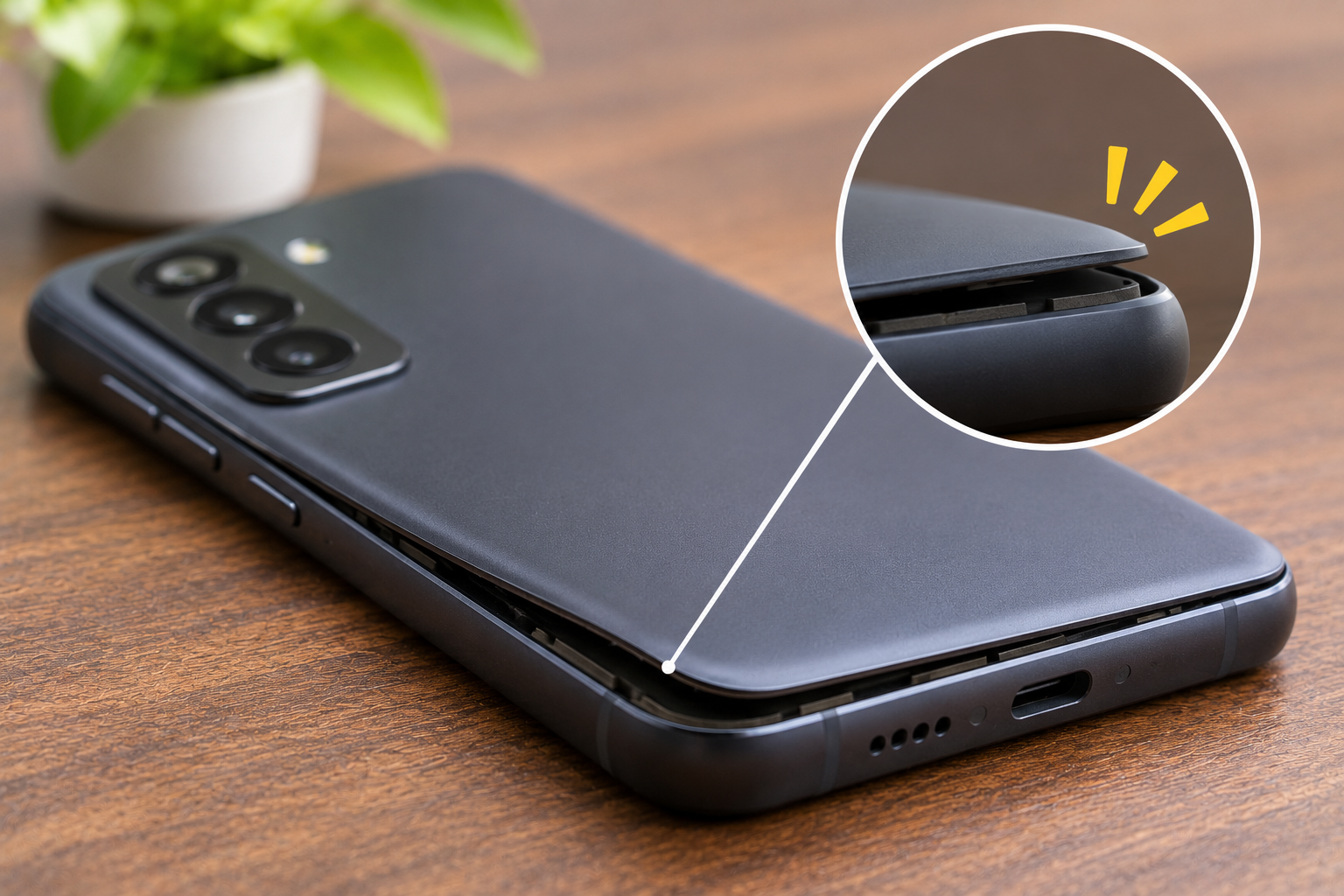
Many Android phones place the battery directly beneath the rear panel. If the battery expands, it can push the back cover away from the frame.
A widening gap, unusual heat, rapid battery drain, shutdowns, or a phone that no longer sits flat make battery swelling more concerning.
Do not press the cover back down if swelling is possible. Pressure on a failing lithium-ion battery is not a safe repair method.
Adhesive failure can look similar
Heat, age, and previous repairs can weaken the adhesive that seals the back cover. In that case, the panel may slowly separate even when the battery is healthy.
The repair can be as simple as cleaning and resealing the phone, but the battery and frame should still be checked first.
That inspection prevents a swollen battery from being hidden behind fresh adhesive.
Drops and frame damage can affect the fit
A hard impact can bend the frame or damage the rear panel. The back cover may no longer sit evenly even if it is not badly cracked.
Frame distortion can also affect cameras, wireless charging, buttons, or the screen. If the gap started after a drop, mention that during service.
Do not use a tight case as a way to force the phone closed.
A lifting back cover can reduce protection from moisture
Once the panel separates, the phone should no longer be treated as properly sealed. Dust, sweat, and liquid can enter more easily through the gap.
If the phone supports wireless charging or NFC, the components near the back panel can also be affected by movement or pressure.
That is another reason to repair the cause rather than simply covering the gap.
How a technician determines what needs repair
The phone can be inspected for battery swelling, frame distortion, cracked back glass, damaged adhesive, and signs of liquid exposure.
If the battery is the cause, replacing it removes the internal pressure before the phone is resealed. If the battery is normal, the focus can shift to the panel, adhesive, or frame.
Moe-Bile Repair’s Android repair service includes battery replacement, back-glass repair, diagnostics, and charging-system work.
Early repair can prevent a larger problem
A small gap can turn into broken glass, moisture entry, camera damage, or a fully separated back panel if it is ignored.
If the phone is still working normally, that is the best time to have it inspected rather than waiting for charging or power problems to appear.
How can you tell adhesive failure from battery pressure?
From the outside, the two can look similar. Adhesive failure often begins along one edge and may remain relatively flat, while battery swelling can create broader outward pressure through the center or a larger section of the back cover.
That distinction is not reliable enough to diagnose the phone at home, especially with models that have flexible rear panels. The presence of heat, rapid battery drain, shutdowns, or a growing gap makes battery swelling more concerning.
The safest approach is to treat the separation as an unknown until the battery can be inspected.
Why heat is an important clue
Heat can weaken adhesive, so a phone that runs hot may develop a lifting rear panel even before the battery visibly swells. Heat also accelerates battery aging, which means both problems can exist at the same time.
If the phone becomes hot during light use, charging, or while sitting idle, note where the heat seems strongest. A technician can use that information along with battery and charging tests.
Do not leave a separating phone in a hot vehicle or direct sunlight, and avoid heavy gaming or charging if the back cover is continuing to lift.
What happens after the underlying cause is fixed
Once the battery, frame, or damaged panel is addressed, the rear cover needs to be cleaned and resealed properly. Old adhesive should not simply be layered with household glue.
A proper seal improves fit and helps protect the phone from everyday dust and moisture, although any opened or repaired phone should not automatically be assumed to retain its original factory water-resistance rating.
The important part is that the cover sits correctly because the internal cause has been repaired, not because external pressure is holding it shut.
What to do before the phone is inspected
If the phone is cool and the gap is small, back up important data while the device is still stable. Remove a tight case only if doing so does not require bending or pressing the phone.
Do not charge the device unnecessarily if the gap is increasing or the phone has started running hot. If the back cover is visibly bulging from the center, treat the phone more cautiously because battery pressure becomes more likely.
Bring the charger if heat or charging behavior changed at the same time. Those symptoms can help connect the lifting cover to battery or power-system problems.
When the repair should not be postponed
If the gap is growing, the phone feels warmer than usual, or battery life has suddenly become much worse, do not wait for the cover to separate completely. Those signs make internal battery pressure more likely.
Even when the cause is only adhesive, the open gap can allow moisture and dust into the phone. That can create a second repair problem on top of the original one.
Getting the phone inspected while it still works normally can help prevent damage to the screen, cameras, or charging components.
Before service, avoid placing heavy objects on the phone or storing it tightly in a pocket or bag where the lifted panel can be pressed back toward the battery. Keep the device in a cool, dry place and minimize charging until the cause of the separation is known.
If the phone still charges normally and the battery life seems unchanged, the problem may still be limited to adhesive or the rear panel, but that should be confirmed rather than assumed. A technician can inspect the battery without relying on appearance alone. That is especially useful on phones where the rear cover is flexible and can hide early battery expansion.
If the rear panel is cracked as well as lifted, replacing the cover may be part of the repair, but the battery and frame still need to be checked first. Fixing the visible panel without correcting the pressure underneath can cause the new cover to lift again.
Get Your Lifting Android Back Cover Checked in Southgate, MI
If your Android phone’s back cover is starting to lift, contact Moe-Bile Repair before pressing or gluing it shut. We can inspect the battery, frame, and rear panel and recommend the correct repair. Visit our Southgate location for service.
