




My iPad Is Bent. Can It Still Be Repaired?
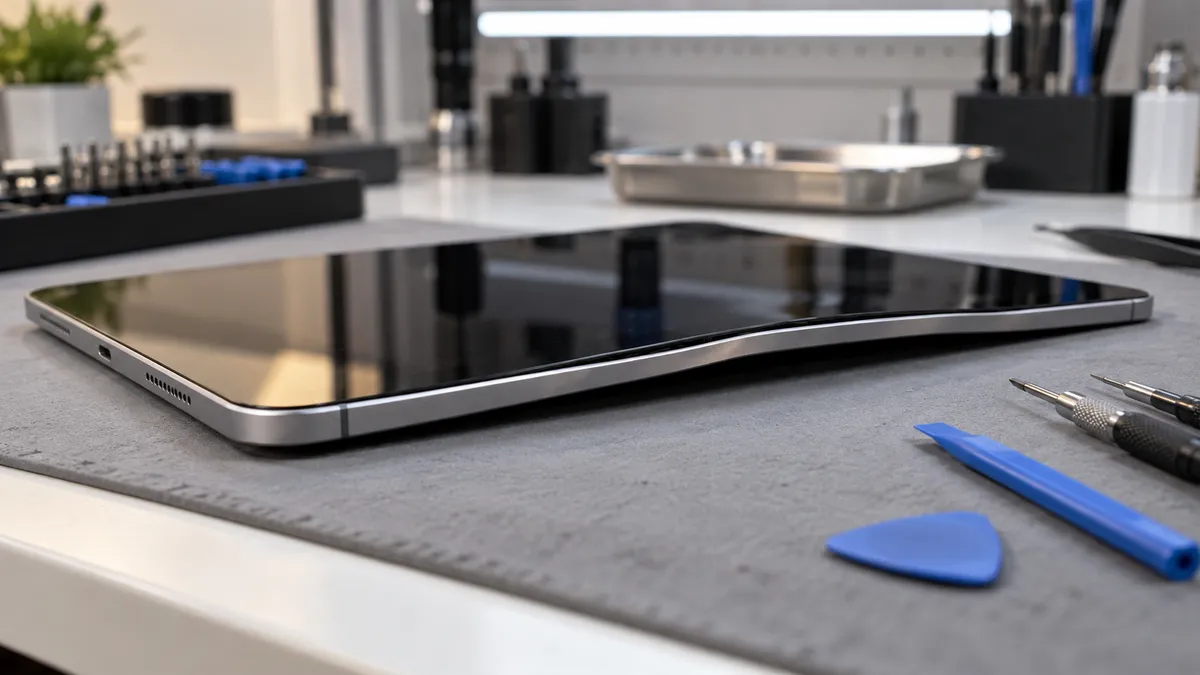
A bent iPad can sometimes be repaired, but whether repair is practical depends on how badly the frame is distorted and whether the bend has damaged the screen, battery, charging system, buttons, internal connectors, or logic board.
A slight bend does not automatically mean the iPad is beyond repair. However, trying to straighten the device yourself can make the damage considerably worse. Modern iPads contain a large lithium-ion battery, fragile display components, and tightly packed internal hardware. Applying additional pressure to the frame can crack the screen, damage the battery, or stress the internal board.
For iPad owners in Southgate, MI, the safest first step is having the device inspected through a professional tablet repair service before deciding whether the frame can be corrected or other components also need attention.
Why Do iPads Bend?
An iPad frame is designed to be lightweight while still providing enough rigidity for everyday use. However, tablets have a much larger surface area than smartphones, which means significant pressure can distort the frame.
A bend can develop after the iPad is dropped, sat on, squeezed inside an overloaded backpack, or placed underneath a heavy object. Larger and thinner iPad models can be especially vulnerable when pressure is applied across the middle of the device.
Sometimes the bend is immediately obvious. In other cases, you may only notice that the tablet no longer sits flat on a desk or that one edge of the screen has begun lifting.
The appearance of the frame is only part of the problem. A physical bend can also place pressure on components inside the device.
Can a Slightly Bent iPad Still Work Normally?
Yes. An iPad can remain fully functional even if the frame has developed a slight bend.
The display may still work, the battery may charge normally, and the touchscreen may continue responding correctly. That does not necessarily mean the bend should be ignored.
A distorted frame can create ongoing pressure against the display assembly or internal components. It may also affect how replacement parts fit if the iPad needs screen or battery repair later.
The more important question is not simply whether the iPad still works. It is whether the bend has created stress that could lead to additional problems.
A technician can examine the frame alignment and determine whether the distortion is primarily cosmetic or whether it is affecting other parts of the tablet.
A Bent Frame Can Damage the Screen
The display assembly sits closely against the iPad frame.
When the frame bends, pressure may become uneven across the glass, touchscreen, and display panel. This can eventually cause cracks, lifting edges, touch problems, discoloration, or image distortion.
Sometimes the screen survives the original impact but develops problems afterward as pressure continues.
You may notice the touchscreen becoming unreliable in one area, the glass separating slightly from the frame, or the display showing lines or dark spots.
If screen problems appear after the iPad has been bent, the frame should be inspected before replacing the display. Installing a new screen onto a significantly distorted frame can create poor fitment or place unnecessary pressure on the replacement component.
Moe-Bile Repair’s tablet repair service includes screen repair and diagnostic services for iPads and other tablets.
Could the Battery Be Damaged?
This is one of the most important reasons not to force a bent iPad back into shape.
Lithium-ion batteries occupy a substantial amount of space inside an iPad. If the chassis bends significantly, the battery may also be compressed, punctured, or otherwise damaged.
A damaged battery can become unstable.
Watch for signs such as unusual heat, rapid battery drain, a chemical smell, screen separation, swelling, or a tablet that suddenly shuts down.
If you notice any of these symptoms, stop using and charging the iPad until it can be inspected.
Do not press a lifted screen back down. If battery swelling is responsible for the separation, additional pressure may damage the battery further.
Can a Bent iPad Affect the Charging Port or Buttons?
Yes. Frame deformation can change the alignment of hardware mounted along the edges of the tablet.
If the bend occurs near the charging port, the cable may stop fitting correctly or charging may become intermittent. You might find that the connector feels unusually tight, loose, or only works at a particular angle.
The power and volume buttons can also become difficult to press if the surrounding frame moves out of alignment.
A repair should therefore look at more than the visible curve of the device. The charging port, buttons, microphones, speakers, cameras, and other components near the damaged area may need to be tested.
This is particularly important after a hard impact because the same force that bent the frame may also have damaged internal connectors.
Can You Straighten a Bent iPad at Home?
Trying to bend an iPad back by hand is not recommended.
Online demonstrations can make frame straightening appear simple, but there is no way to see exactly how much stress is being placed on the battery, display, or logic board while force is applied.
Pressing the tablet against a table, twisting it by hand, clamping it, or placing weight on it can turn a manageable frame issue into a broken screen or damaged battery.
Even if the frame looks straighter afterward, internal damage may still have occurred.
Professional assessment is safer because the technician can first determine where the bend is located and whether components near that area are already damaged.
Does a Bent iPad Frame Always Need Replacement?
Not necessarily.
The correct repair depends on the severity and location of the deformation, the iPad model, and the condition of the rest of the device.
Minor distortion may not justify replacing major components if the tablet is functioning normally and the bend does not interfere with the screen or internal hardware.
More severe frame damage may require housing or chassis work, particularly if the tablet no longer closes properly or replacement parts cannot be fitted securely.
There are also situations where extensive structural damage makes repair economically impractical.
A useful diagnosis should therefore answer two questions: what has actually been damaged, and does repairing those components make sense for that particular iPad?
What If the iPad Was Bent After a Drop?
A bent frame after a significant drop deserves a more complete inspection.
The visible bend may not be the only damage.
Impact can affect the display connectors, battery, cameras, charging port, buttons, or logic board. The iPad may continue working immediately after the accident and then develop symptoms later.
Pay attention to changes such as intermittent charging, touchscreen problems, unexplained restarts, abnormal heat, battery drain, screen flickering, or buttons that no longer respond normally.
These clues can help a technician determine which areas need closer testing.
Should You Back Up the iPad Before Repair?
If the iPad is still operating normally, backing up important data is a sensible precaution.
Physical damage can sometimes worsen without much warning. A damaged connector, battery problem, or stressed logic board may eventually prevent the device from starting.
Photos, documents, notes, work files, authentication information, and other important data should be backed up while the device remains stable enough to use.
However, if the iPad is severely bent, unusually hot, swollen, or showing signs of battery damage, do not continue operating it simply to complete a backup. Safety takes priority.
Tell the repair technician if data preservation is particularly important before any major troubleshooting or restoration is performed.
How Is a Bent iPad Diagnosed?
A proper inspection begins with the condition of the frame.
A technician can check where the chassis is distorted and whether the bend has changed the alignment of the screen, buttons, charging port, or other exterior components.
The display and touchscreen can then be tested for cracks, dead areas, false touches, or pressure-related problems.
Battery behavior, charging, cameras, speakers, and buttons may also be checked depending on where the damage occurred.
If the tablet has more serious symptoms, further diagnostics may be required to determine whether internal connectors or the logic board were affected.
This approach is more reliable than assuming the iPad only needs to be physically straightened.
Is It Worth Repairing a Bent iPad?
That depends on the extent of the damage.
An iPad with a mild frame bend and otherwise healthy hardware may still have substantial useful life remaining.
The decision becomes more complicated when the tablet also needs a new display, battery, charging port, housing, or board-level repair.
Age also matters. Investing heavily in multiple repairs on an older iPad may make less sense than repairing a newer device with one localized problem.
A professional inspection gives you enough information to compare the likely repair with the condition and remaining value of the tablet.
Bent iPad Repair in Southgate, MI
A bent iPad is not automatically a lost cause.
Some devices continue working with minor frame distortion, while others suffer screen, battery, charging, button, or internal hardware damage from the same event that caused the bend.
Moe-Bile Repair provides iPad and tablet repair in Southgate, MI, including diagnostic services that can help determine how far the physical damage extends.
The important step is to avoid trying to force the tablet back into shape before its condition is understood. A repair technician can inspect the frame, screen, battery, charging system, and related components and explain whether repair is practical.
You can visit Moe-Bile Repair’s Southgate location or contact Moe-Bile Repair to have a bent iPad evaluated.
If the device is still working, dealing with frame damage before it begins affecting other components may help prevent a physical problem from becoming a more complicated repair.
