




How to Check if a Used Phone Is Really Unlocked
How Can I Check if a Used Phone Is Really Unlocked?
A used phone may be advertised as unlocked, but that word can refer to more than one restriction. A phone can be carrier-unlocked and still have an activation lock, an unpaid financing issue, a blocked IMEI, or compatibility limits that prevent it from working the way you expect.
Before buying a used iPhone or Android phone, confirm both network eligibility and account status. Testing the device before money changes hands can prevent the frustration of owning a phone that cannot be activated on your carrier.
Moe-Bile Repair in Southgate, MI offers quality used devices including iPhones and Android phones, and the shop states that its used devices are inspected and tested before sale.
What Does “Unlocked” Actually Mean?
A carrier-unlocked phone is not restricted to one wireless carrier's network. In principle, you can activate it with another compatible carrier if the device supports that carrier's network bands and the IMEI is eligible.
That is different from an iPhone Activation Lock or Android Factory Reset Protection. Those account-security features can prevent a new owner from setting up the phone even if the cellular network lock has been removed.
A truly usable used phone needs both sides to be clear: the carrier should accept it, and the previous owner's account should no longer control the device.
Check the Phone’s Settings First
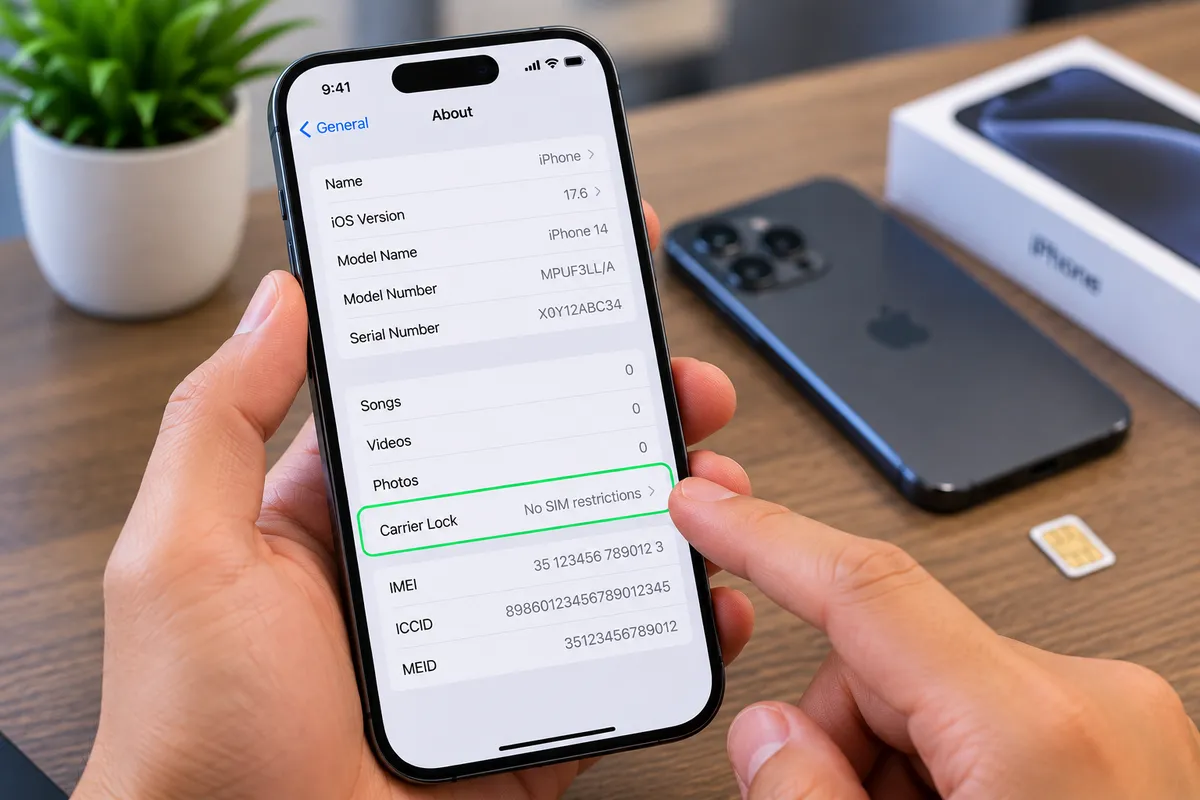
On many phones, the settings menu can provide useful clues about carrier status. On an iPhone, carrier-lock information may be shown in the device information area. On Android phones, the wording varies by manufacturer and carrier.
Settings are helpful, but they should not be the only test. Software information can confirm part of the picture, while a live SIM or eSIM test shows whether the phone can actually connect to another carrier.
If a seller refuses to let you inspect basic device information before purchase, treat that as a reason to slow down.
Test With a Different Carrier When Possible
One of the strongest practical checks is using a SIM card or eSIM from a carrier different from the one previously used on the phone. If the device accepts the service and connects normally, that supports the claim that it is carrier-unlocked.
A failed connection does not always prove the phone is locked. The phone may not support that network, the SIM may have an issue, or the carrier may need to activate the IMEI first.
That is why carrier compatibility should be checked alongside lock status rather than treated as the same thing.
Ask the Carrier to Check the IMEI
Every phone has a unique equipment identifier, commonly called an IMEI. Before buying a used phone, ask the carrier you plan to use whether that IMEI is eligible for activation.
A phone can be unlocked yet still be blocked because it was reported lost or stolen, has unresolved account problems, or is otherwise restricted from activation.
Do not rely solely on a seller saying that an IMEI is clean. Checking with the carrier you intend to use provides a more relevant answer because eligibility can depend on that carrier's policies and network.
Make Sure Activation Lock or Factory Reset Protection Is Removed
For iPhones, the previous owner's Apple account should be removed before the phone is handed over. If the device asks for the former owner's credentials during setup, you may not be able to use it.
Android devices can have a similar protection tied to the previous Google account. After a reset, the phone may require credentials from an account that was previously synced to the device.
The safest transaction is one where the seller removes their account in front of you and the phone can proceed through normal setup without requesting their credentials.
Check Whether the Phone Is Still Being Financed
Carrier unlocking and financing status are related but not identical. A phone may appear functional today while still being attached to an installment plan or account obligation.
Ask the seller directly whether the device has been paid off, and confirm what the intended carrier can verify about the IMEI. Policies differ, so do not assume that an unlocked label automatically means there are no account-related issues.
Buying from a shop that has already inspected the device can reduce uncertainty, but you should still confirm carrier compatibility for your own service.
Unlocked Does Not Guarantee Network Compatibility
Even a fully unlocked phone may not work perfectly on every network. Different phone models support different cellular bands, technologies, and carrier features.
This matters most when a phone was originally sold for another carrier, another country, or a different market. Basic calling and data may work while certain network features do not.
Before buying, identify the exact model number rather than relying only on the marketing name. Two phones with the same product name can have different network support.
Inspect the Phone Beyond Its Lock Status
A used phone can be genuinely unlocked and still be a poor purchase if the battery, screen, cameras, charging port, or frame are in bad condition.
Check for cracks, display lines, touch problems, camera focus, speaker and microphone performance, charging behavior, buttons, Wi-Fi, Bluetooth, and battery condition. Look for signs of swelling or a back panel that is lifting.
If the phone has been repaired before, quality can vary. A clean network status does not tell you anything about the physical condition of the device.
Be Careful With Deals That Cannot Be Tested
A low price can be attractive, but a phone that cannot be powered on, activated, or checked before purchase carries more risk. The same is true when a seller rushes the transaction or avoids questions about the account and carrier history.
If the deal depends on you fixing the network status later, assume there is a real possibility that the restriction cannot be resolved.
The safest used-phone purchase is one where you can verify the phone's identity, condition, account status, and compatibility before committing.
Buying a Used Phone From a Local Device Shop
A local shop can provide another layer of accountability because you have a physical place to return to with questions about the device. It also allows you to inspect the phone directly instead of relying only on photos or a marketplace description.
Moe-Bile Repair’s used device inventory includes iPhones, Android phones, iPads, tablets, and other electronics. The business states that used devices are inspected and tested by its technicians before sale.
Even when buying from a shop, tell the staff which carrier you plan to use so compatibility can be discussed before purchase.
Used Phones in Southgate, MI
Checking whether a used phone is really unlocked means looking beyond one label. Verify the carrier lock, IMEI eligibility, previous-owner account removal, financing status when possible, and network compatibility for the carrier you plan to use. Taking a few extra minutes to verify these details before purchase is usually easier than trying to resolve an activation problem after the sale.
If you are shopping locally, visit Moe-Bile Repair’s Southgate location to ask about available used devices or discuss compatibility before choosing a phone.
You can also contact Moe-Bile Repair if you are looking for a particular device or want to ask what information to bring when checking carrier compatibility.
