




Why Is My Laptop Hinge Pulling Away From the Case?
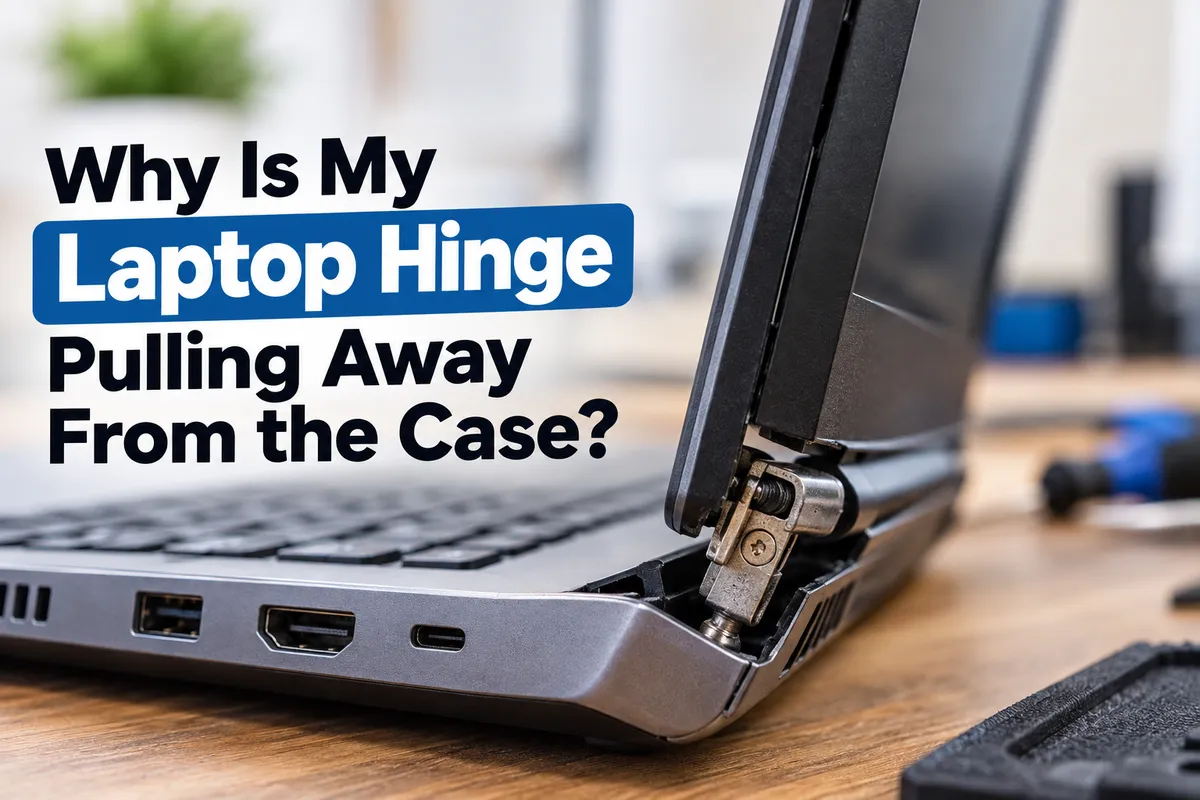
If your laptop hinge is pulling away from the case, the hinge itself may not be the only part that is damaged. In many cases, the metal hinge is still functional, but the plastic mounting points, threaded inserts, display housing, or laptop chassis holding it in place have cracked or broken.
The problem often starts gradually. You may notice a small gap near one corner of the screen, hear a cracking sound when opening the lid, or feel that one hinge has become much stiffer than the other. Eventually, the case may begin separating each time the laptop is opened.
For laptop owners in Southgate, MI, getting the problem inspected early can sometimes prevent additional damage to the screen, display cable, Wi-Fi antenna, charging components, or laptop housing. Moe-Bile Repair provides computer and laptop repair services for hardware problems including damaged screens, batteries, charging issues, and other internal faults.
Why Does a Laptop Hinge Separate From the Case?
Laptop hinges are designed to create enough resistance to hold the screen in position while still allowing the lid to open and close smoothly. The hinge is usually attached to mounting points inside the laptop's bottom case or display housing. These mounting points may use screws, metal brackets, threaded inserts, or reinforced plastic structures.
Over time, repeated opening and closing can place stress on these areas. If the hinge becomes unusually stiff, the force required to move it increases. Instead of the hinge rotating normally, that force can transfer into the surrounding plastic or frame. Eventually, the mounting points can crack or pull away from the case.
This is why a laptop hinge that appears to be coming loose may actually involve damage to the chassis rather than the hinge itself.
A Stiff Hinge Can Break the Laptop Case
One common cause of hinge damage is excessive hinge resistance. Laptop hinges can become stiff because of wear, contamination, corrosion, internal damage, or changes in the hinge mechanism over time.
When you open the screen, the force has to go somewhere. If the hinge resists movement, the screws and mounting points absorb more pressure. Eventually, the plastic surrounding them may crack.
You might hear a clicking or popping sound each time the laptop lid moves. Another warning sign is one corner of the keyboard deck or bottom case lifting slightly when the screen is opened. Continuing to use the laptop this way can allow a small crack to spread into a much larger structural problem.
Drops and Impact Can Damage the Hinge Mounts
A laptop does not have to land directly on the hinge for hinge damage to occur. A drop can twist the chassis enough to crack the mounting points or distort the frame. The damage may not become obvious until the laptop is opened and closed several more times.
The same thing can happen if a laptop is carried in an overloaded backpack, squeezed between heavy objects, or picked up repeatedly by one corner of the screen. If hinge separation starts shortly after an impact, the entire surrounding area should be inspected. The visible gap may only be one part of the damage.
Why Does the Case Open Every Time I Lift the Screen?
When the hinge mounting points break, the hinge may remain stationary while the surrounding case moves instead. As you lift the screen, the damaged hinge pulls upward against the case. This can cause the palm rest, keyboard deck, bottom cover, or display bezel to separate.
At first, the case may settle back into position when the laptop is closed. That does not mean the problem has corrected itself. Each opening cycle can enlarge the broken mounting area and place additional stress on nearby components.
Once the case begins visibly separating, minimizing unnecessary opening and closing is usually wise until the laptop can be inspected.
Can a Broken Laptop Hinge Damage the Screen?
Yes. The display assembly and hinge system are closely connected. When one side of the screen is no longer properly supported, the display can twist every time the lid moves. That twisting may eventually crack the LCD panel or damage the outer screen housing.
A damaged hinge can also put pressure on the bezel surrounding the display. If you notice screen flickering, lines, discoloration, or changes when the lid is moved, the hinge problem may already be affecting more than the case.
Moe-Bile Repair's computer repair service includes laptop hardware and broken-screen diagnostics, which can help determine how far the damage extends.
Display Cables Can Be Damaged Near the Hinge
The video cable connecting the laptop display to the motherboard commonly passes through or near the hinge area. Repeated movement from a loose or damaged hinge can pinch, stretch, or rub against this cable.
That can create symptoms such as a screen that flickers when moved, briefly goes black, displays unusual colors, or only works at certain lid angles. Wi-Fi antenna wires may also pass through the same general area on some laptop models.
This is one reason hinge damage should not be treated as purely cosmetic. A broken mount can eventually interfere with components that were functioning normally when the case first began to separate.
Can the Charging Port Be Affected?
On some laptops, the charging port is positioned near one of the hinges. If the case begins separating or the frame becomes distorted, nearby charging components can move out of alignment.
You may notice the charging connector becoming loose, the laptop charging intermittently, or the power cable needing to be positioned differently. Whether this happens depends on the laptop design and where the hinge damage is located.
During diagnosis, a technician should consider the condition of surrounding components instead of focusing only on the visible hinge.
Should You Keep Opening and Closing the Laptop?
If the case is already separating, avoid opening and closing the laptop more than necessary. Every movement of the damaged hinge can increase stress on broken mounting points.
If the laptop is already open and working normally, leaving the screen in a stable position until it can be inspected may help reduce further movement. Do not force a stiff hinge.
You should also avoid pressing the separated case back together while moving the screen. That may temporarily hide the gap without addressing the broken structure underneath.
Can You Glue a Laptop Hinge Back Together?
Simply adding glue around the outside of the case is usually not a proper hinge repair. The hinge carries significant mechanical force. The damaged mounting points must be strong enough to withstand that force every time the laptop is opened.
Applying adhesive without identifying what broke can also make future repair more difficult. Depending on the laptop design and extent of the damage, repair may involve the hinge, mounting brackets, threaded inserts, palm-rest assembly, bottom housing, or display back cover.
The correct solution depends on where the structure failed.
How Technicians Diagnose Laptop Hinge Damage
A proper laptop hinge diagnosis begins by checking how the screen moves and identifying which part of the case is separating. The technician may inspect the hinge resistance, mounting screws, brackets, chassis, display housing, bezel, and surrounding components.
The laptop may need to be partially disassembled to see whether the internal mounting points have broken. The screen cable and other wiring near the hinges should also be checked if the device has display or connectivity symptoms.
This inspection helps separate several possible problems that can look similar from the outside. A loose screw may require a different repair from a cracked plastic mount, broken hinge bracket, damaged back cover, or distorted laptop frame.
Does the Entire Laptop Case Need to Be Replaced?
Not always. The necessary repair depends on which structure has failed and how much surrounding material remains intact.
In some laptops, the hinge mounts are integrated into the palm-rest assembly. In others, they may be attached to the bottom case or rear display cover. Severe damage may require replacing one of these larger housing components.
A technician should also determine why the failure occurred. If an excessively stiff hinge is reused without addressing the resistance, it can place the same stress on the repaired mounting points and cause the problem to return.
When Should You Stop Using the Laptop?
A small hinge gap is not always an emergency, but some symptoms deserve faster attention. Stop repeatedly moving the lid if the case is separating significantly, the screen begins cracking, internal wires become visible, or the display cuts out whenever the hinge moves.
Unusual battery swelling, severe overheating, or electrical damage near the affected area should also be taken seriously. If important files are stored on the laptop and it is still operating normally, backing them up before the structural problem worsens is a sensible precaution.
Laptop Hinge Repair in Southgate, MI
A laptop hinge pulling away from the case usually means more than a loose hinge. The real problem may involve broken mounting points, a damaged chassis, excessive hinge resistance, impact damage, a cracked display housing, or surrounding components that have been stressed as the case separates.
Moe-Bile Repair provides laptop and computer repair in Southgate, MI, including diagnostics for hardware problems, damaged screens, charging issues, batteries, and other laptop faults.
Having the laptop inspected before the hinge completely separates can help reduce the chance of additional damage to the display, video cable, case, or nearby components.
You can visit Moe-Bile Repair's Southgate location or contact Moe-Bile Repair to have the laptop evaluated.
The key is not simply making the case close again. A lasting repair requires identifying which hinge components and mounting structures failed, correcting the source of the excessive stress, and making sure the display can open and close without continuing to damage the laptop.
